CPT Stratigraphy
Tab
Generate soil layers from CPT data with automatic Ic classification.
Tab Overview
The CPT Stratigraphy tab turns CPT data into soil layers using Ic-based classification, then lets you edit, regenerate, and export the result.
- Tabular view of layers with depths, ISO class, and averaged parameters.
- Color-coded soil columns with depth scale on the left.
- Curves include depth boundaries that match the layer table.
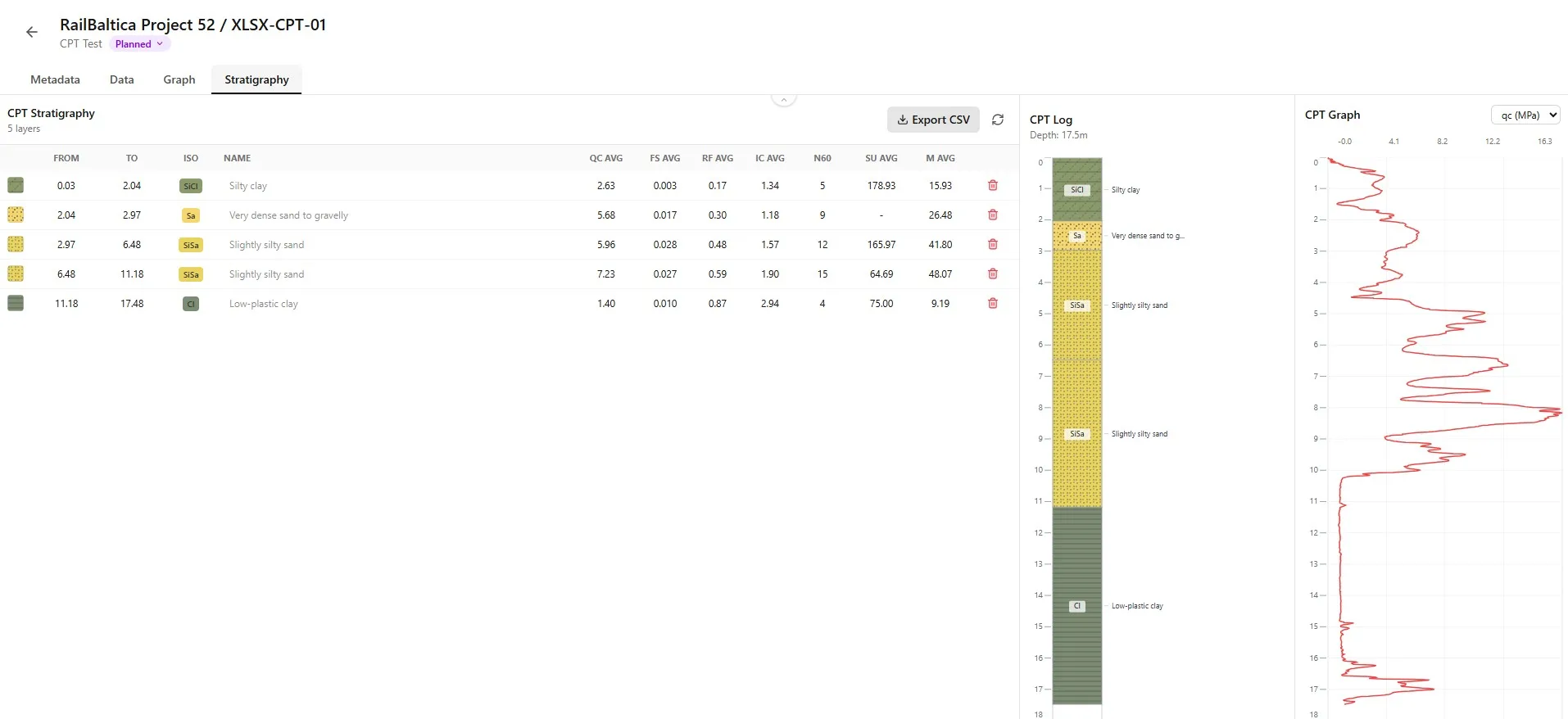
Layer Columns
Each layer row carries both editable fields and automatically calculated values.
Editable Columns
| Column | Description |
|---|---|
| Hatch pattern used on the log (editable). | |
| Layer top depth (editable). | |
| Layer bottom depth (editable). | |
| ISO 14688 soil classification (editable). | |
| Layer name (editable). |
Calculated Columns
| Column | Unit | Description |
|---|---|---|
| Average cone resistance for the layer. | ||
| Average sleeve friction. | ||
| Average friction ratio. | ||
| Average soil behaviour index. | ||
| Average SPT N60 equivalent. | ||
| Average undrained shear strength. | ||
| Average constrained modulus. |
Averaged Parameters
Averaged parameters reflect data inside each layer's depth range only.Editing Layers
Edit layers directly in the table to refine the automatic result.
Adjust from/to depths to merge or split layers.

Override the ISO class when the automatic value disagrees with the field log.

Change the hatch pattern shown on the log.

Rename a layer to reflect site-specific terminology.

- Click a cell to edit the value inline.
- Save by leaving the cell or pressing Enter.
- Edits are recorded immediately to the project.
Visualization
The tab provides two visualizations alongside the layer table.
CPT Log
CPT Log — geological log view with depth-indexed soil columns.

CPT Graph
CPT Graph — qc/fs/Ic curves aligned to layer boundaries.

Choose which averaged parameter to display in the table.

Available Parameters
- qc — average cone resistance.
- fs — average sleeve friction.
- Rf — average friction ratio.
- u2 — average pore pressure at shoulder.
- qt — average corrected cone resistance.
- Ic — average soil behaviour index.
- Qt — average normalized cone resistance.
- Fr — average normalized friction ratio.
- Bq — average pore pressure ratio.
- N60 — average SPT equivalent.
- Su — average undrained shear strength.
- E — average Young's modulus.
- M — average constrained modulus.
Regenerating Stratigraphy
Regenerating replaces all current layers with a fresh result from the algorithm.
Click Regenerate to rebuild stratigraphy from the CPT data.

Set a minimum layer thickness to merge thin transitions.

Click Generate to build initial stratigraphy when the table is empty.

Review every generated layer before exporting.

Practical Example
A 0.5 m threshold filters out 10–20 cm noise spikes while preserving real layers.Regenerate Warning
Manual edits will be lost when you regenerate. Export first if you want to keep them.Exporting Stratigraphy
Stratigraphy can be exported with the rest of the CPT object.
Click Export to generate a PDF or CSV with the current stratigraphy.

Export Contents
- PDF log with stratigraphy table.
- CSV export of the layer table.
- Stratigraphy is included in the full CPT export.
- Hatch patterns and ISO codes are preserved.
- Manual edits appear in every export.
Practical Example
Use the Export tab to produce a PDF log including the stratigraphy table.ISO Classification Reference
Borebase uses the ISO 14688 classification family for soil layers. The most relevant codes:
| Column | ISO Class | Description |
|---|---|---|
| Sensitive fine-grained / organic soils | ||
| Organic soils | ||
| Clay | ||
| Silt mixtures | ||
| Sand mixtures | ||
| Sand |
ISO Classification
ISO 14688 codes are inferred from Ic ranges and can be overridden manually.Best Practices
Generation
- Always inspect the CPT trace alongside the generated layers.
- Adjust minimum thickness to suppress noise without losing real layers.
- Compare automatic ISO codes with the field log and override when needed.
- Rename generic layers to project-specific terminology before exporting.
Editing
- Merge thin transition layers if they are not load-bearing.
- Use hatch patterns that match your office standard.
- Re-export after every set of edits to keep deliverables in sync.
- Save a snapshot before regenerating if manual edits are extensive.
Reporting
- Cross-check averaged Ic against the dominant soil type.
- Document any manual overrides in the project notes.
- Use the CPT Log view to communicate stratigraphy with non-technical readers.
- Validate stratigraphy against nearby boreholes whenever possible.