Well Design
Borehole Construction
Deep Dive
Document well completion details including casings, screens, grout, filter packs, and more. Visualize construction with an interactive schematic that overlays stratigraphy for complete well documentation.
01
Interface Overview
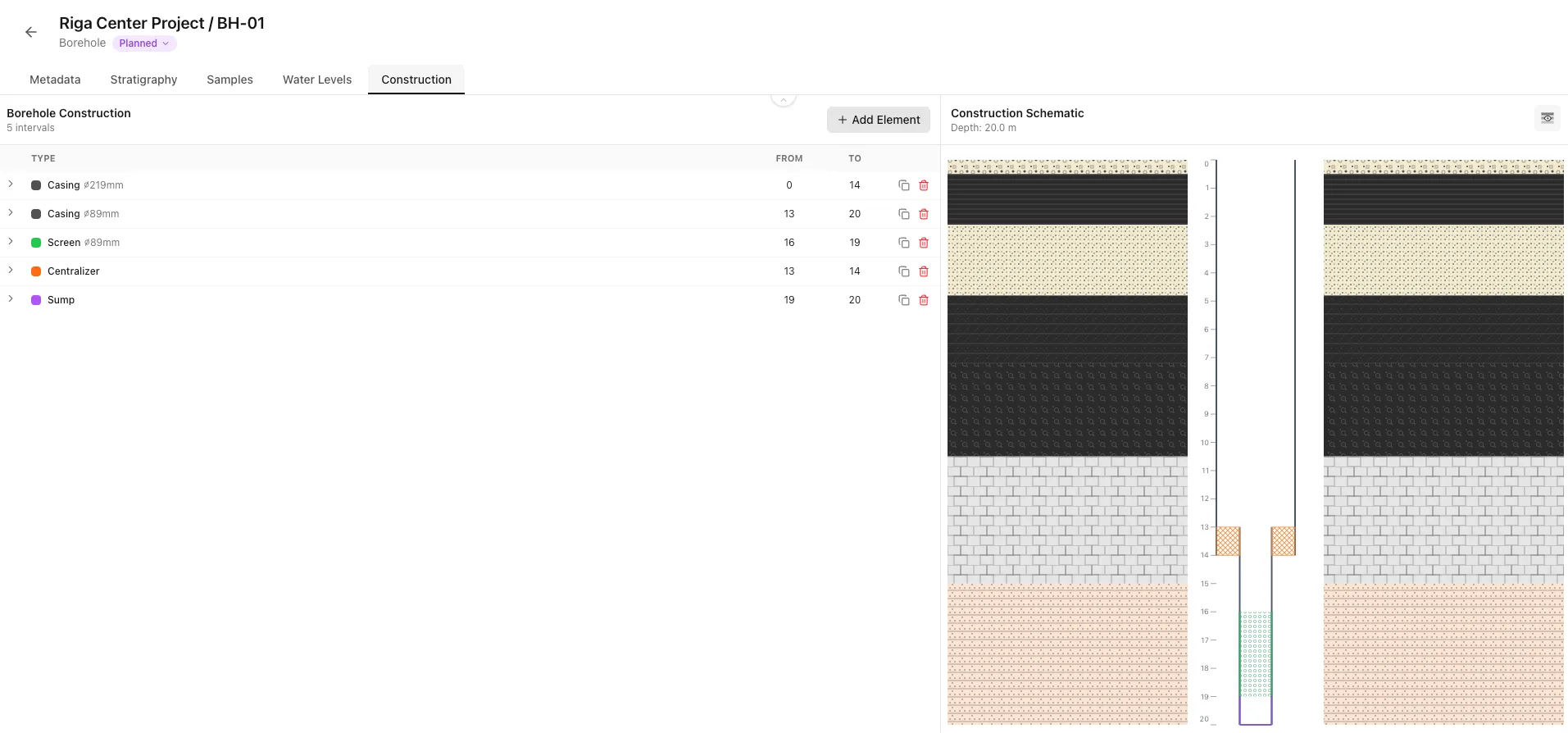
The Construction tab is divided into two synchronized panels:
- Add construction elements like casing, filter, and seal sections layer by layer.
- A schematic visualization shows the well construction next to the depth scale.
- Diameters can be set per layer for accurate as-built records.
02
Adding Construction Elements
Click "+ Add Element" in the table header to create a new construction element.
Construction Element Types
- Solid pipe to stabilize the borehole. Specify outer/inner diameter and material (steel, PVC, stainless, HDPE, fiberglass).
- Perforated/slotted section for water intake. Specify diameter, slot size, and screen type (slotted, wire-wrapped, perforated, louvered).
- Filter section — permeable element used for groundwater monitoring.
- Sealing section — bentonite or grout to isolate aquifers.
- Material to fill annular space in non-critical zones. Specify material and compaction level.
Tip
Practical Example
Layers are ordered top-down by depth — gaps are flagged automatically.03
Layer Properties
Each construction layer has depth limits, a type, and diameter information.
- From depth (m) — top of the construction layer.
- To depth (m) — bottom of the construction layer.
- Diameter (mm) — outer diameter of the element.
- Material (Steel, PVC, Stainless Steel, HDPE, Fiberglass)
- Add free-text notes for any special construction details.
Info
Diameter Reference
Use the borehole drilling record to confirm diameters before saving.04
Understanding the Schematic
The right panel shows a vertical cross-section of the borehole construction.
Visual cross-section showing casings, screens, annular fills, and optional stratigraphy overlay. Click elements to expand their details.
Document well construction to support groundwater monitoring and reporting.