110100110011101100100011001100
Product updates

WHAT IS NEW

The latest Borebase features, improvements and fixes — with a closer look at the changes that matter.

v2.5.1

Clearer project cards and calmer project tabs

  • Fixed

    The project card on the dashboard map now lists every kind of object the project holds - boreholes, CPT, SPT, dynamic probing and weight soundings - each with its own count. Dynamic probing and weight soundings were previously missing from it.

  • Improved

    Moving between a project's tabs no longer slides the page in from the side each time. Only opening a project does.

  • Improved

    The location map on an object's overview now shows only that object, without the project's other objects around it.
v2.5.0

Weight sounding and topo plans, imported from 3D-Win and CAD

  • New

    Weight sounding

    Weight sounding (painokairaus, ISO 22476-10) is a new object type: its intervals and the diagram Finnish reports use sit side by side on the Sounding tab, with the soil both as logged and as ISO 14688 and each layer hatched in a pattern you can change. When you create one you can import a 3D-Win .kr.tdw file instead, and every sounding in it becomes its own object. Before anything is created you see the soundings found and the coordinate and height system they were read in, and can change both; in a project that already has a topo plan, they start in the plan's systems.

  • New

    Topo plans on the project map

    Load the surveyor's DWG, DXF or 3D-Win (.tdw) drawing and lay it under the project map, over satellite imagery or on a blank sheet, drawn as the surveyor plotted it (tree symbols with their species letter, dashed lines and heavier pens, coloured labels at the plotted size), with its layers grouped into relief, buildings, roads, utilities and the rest so you can hide what you do not need. Borebase suggests the coordinate system from the numbers in the drawing and shows on a small map whether your boreholes fall inside it before you save. In Files, a DWG, a 3D-Win drawing or a soundings file can be opened and looked over before you import it, by anyone who can see the project's files, and a drawing's soundings file is offered for import right after its topo plan is saved. If the surveyor's 3D-Win code file (code_*.dat) lies in the same Files folder as the drawing, its symbols, line types and pens are used.

  • New

    The spot heights in a topo plan become a ground surface: after saving you can look over the points it found and leave out any that are clearly off, then or later from the map's layer list, and cross-sections then draw the ground along that surface between boreholes, with your own surface points still taking priority. Where a borehole's logged collar elevation differs from the surface by more than 0.3 m, its location card shows both and lets you take the surface value with one click. In the 3D model's Build settings, Use topo plan relief makes that surface the model's ground, so there is no DEM to find and upload: the model follows the plan's heights between the boreholes and still passes through every collar.

  • New

    Over a topo plan, weight soundings are drawn the way a Finnish ground investigation plan shows them: the point number, the collar elevation, depth and bottom elevation to a decimetre, and the mark of how the sounding stopped, and cross-section lines are thin black lines lettered and arrowed at their ends unless you gave them a style of your own. A 3D-Win soundings file you import is kept in the project's Files, and can be imported again from there. Where a sounding of yours stands on the surveyor's own symbol, only yours is drawn, and the symbol and its numbers are drawn the size the surveyor plotted them, growing as you zoom in.

  • New

    Find the boreholes in the surveyor's drawing and make objects of them: the list shows each with the name and collar elevation the drawing gives it, you tick the ones you want and can change their names and types, and each is placed exactly where the surveyor drew it. A borehole you already have there is marked, and its symbol in the drawing gives way to your object.

  • New

    Download the topo plan as a DXF from the map's layer list and open it in AutoCAD, BricsCAD or QGIS: the surveyor's drawing in its own coordinates, 3D-Win drawings included, with the layers you hid on the map switched off, and My drawings and the project's objects on layers of their own.

  • New

    When a drawing's layers are not sorted into groups for you, as on an architect's site plan, Group by name puts layers whose names start alike together in one click; you can rename a group or undo it, or tick layers and put them into a group of your own, and each group switches on and off as one on the map. Layers of a 3D-Win drawing go into relief, vegetation, utilities and the other groups by their codes.

  • New

    Your own drawings on the project map

    Draw lines, areas, circles and text of your own over the project map, with or without a topo plan, and set their colour, width, dashes and fill; the people on the project see them too. Text keeps its size on the ground as you zoom, like the surveyor's labels, and can be bold, turned with a handle on the map, outlined or set on a coloured background. My drawings in the layer list shows each drawing: click one to zoom to it and edit it, hide it or delete it. Pick lines, areas and texts of the surveyor's drawing and copy them into My drawings to change them, while the surveyor's drawing stays as it was.

  • New

    Project overview

    A project now opens on its Overview: the map with every object on it, progress against the plan, what is due next and who is assigned, on one screen. Click an object on the map for its card, then open it or find it in the Objects list. Each card is edited in place, and a new project lists what is left to set up instead of a page of empty fields.

  • New

    Object overview

    Every borehole and test opens on an Overview built the same way: where it stands among the other objects, its depth and dates against plan, its key figures, its technical details and what it is tied to, each edited in place. A borehole's CPT, SPT and DPT tests can now be tied to it from the borehole itself, as well as from each test.

  • New

    The project overview shows what changed lately and who changed it, for everyone on the project, whether or not they follow it.

  • Improved

    Project and object pages have one slim header row: the name and its status beside the tabs, and on an object page the project it belongs to in front of its name. The object counts that sat in the project header are on the Overview's Objects card now, where each still opens the list filtered to what it counts.

  • Improved

    The size of object markers on the project map is now set with a slider, from 12 to 48 pixels, instead of three fixed sizes, and the exported map PDF follows it.

  • Improved

    Right-click any row in the map's layer list, an object, a group, a cross-section, a measurement, a layer of the topo plan or one of your drawings, and the map zooms to it, framed to its own size.

  • New

    Weight soundings can now go on export sheets: the PA diagram with its values if you want them, half-turns and load as lines, a hatched soil column, and the soil in ISO, as logged or USCS with a dashed line across the sheet at each new layer. Batch export makes one sheet for every weight sounding in the project, as PDF or DXF.

  • Improved

    Text on export sheets can now be set up to 20 pt: layer names, sample labels, construction notes and the weight sounding soil column.

  • New

    Weight soundings can be drawn on cross-sections and compared with boreholes and CPTs: their soil layers in the hatches picked for them, with half-turns or load beside them, on screen and in the DXF of the section.

  • Improved

    Boreholes, SPT and dynamic penetration tests have new icons: a tricone bit, a drop hammer over its sampler, and a blow landing on the rod. Each type is now easier to tell apart at a glance in object lists, filters and the project header.

  • Improved

    ETRS-TM35FIN and ETRS-GK25, Finland's national coordinate system and the one Helsinki, Espoo and Vantaa survey in, are now among the recommended coordinate systems.

  • Improved

    Coordinates in a projected system are now entered and shown east first, then north, as surveyors write them, when you create a project or a borehole and on the location maps. A new borehole also opens in the coordinate system its project was recorded in.

  • Fixed

    Some cross-sections drawn before August could no longer be saved or renamed and showed an error instead. They save normally again, with every band you can see left as it was.

  • Improved

    Cross-sections have a new Column over the hatch setting next to the column width. Untick it to draw the hatch of the layers between the boreholes over the logged columns instead of under them; the layer names and depths stay on top either way.

  • Fixed

    The tests listed on a borehole showed every one of them as planned, whatever its real status. They now show whether each is planned, active, completed or cancelled.

  • New

    The cross-section editor can now draw a first version of the section for you. Generate section opens over the whole screen with four presets for the usual cases, and under Advanced every setting they are made of: the whole section at once or neighbour by neighbour, CPTs that only refine the boreholes' boundaries, are weighed against them or count as boreholes, how much detail to draw and how steeply a layer may dip. Boreholes, CPTs and weight soundings are joined, the bands you already drew are kept, CPT layers you gave one hatch stay one layer, the CPTs can be drawn in the boreholes' hatches on that section only, and afterwards it lists what you may want to take off again, ready to go in one click.

  • Improved

    In the canvas view of the cross-section editor the lists of sections and objects now start folded, leaving the left panel to the elements of the section you are drawing.

  • Improved

    A band that joins several layers of one borehole is now drawn in the hatch of the thickest of them, so a thin asphalt layer no longer colours the whole band of fill under it.

  • Improved

    A pinch-out of a layer that starts at the ground and ends on the ground now follows the ground line on screen, in the PDF and in the DXF, instead of leaving a thin gap under it.

  • Improved

    On a cross-section, CPT layers that follow one another can now be joined into one band, also where the CPT's layers start a centimetre or two below the previous one.

  • Fixed

    In fullscreen, the cross-section editor's toolbar now fits on the screen with every tool and the button that leaves fullscreen, instead of scrolling sideways.

  • New

    An eraser in the cross-section toolbar removes a band, pinch-out, lens or fault with one click, and every element in the side panel has its own delete button.

  • Improved

    The cross-section editor's Map and Canvas switch now sits in the toolbar. On the map, the right column shows how long the section line is and which objects stand near it, and objects can be found by name and filtered by type before you add them.

  • New

    Geophysics curves

    Import borehole geophysics from LAS or CSV, process readings and compare several curves on a shared depth axis. Add a geophysical curve to a borehole on a cross-section and keep its color in report sheets, PDF and DXF exports.

    Scroll through survey curves, then choose the curve and line color displayed beside a borehole on a cross-section.
v2.4.1

Long stratigraphy layer names, faster batch PDF export

  • Fixed

    A stratigraphy import with very long layer names now goes through: a name over 255 characters is shortened, the preview warns about it first, and if any layers cannot be saved you are told how many.

  • Improved

    While a batch export is being turned into files on the server, the export window now shows how many files are ready and says that the server is still converting, instead of sitting on a full progress bar.

  • Improved

    Batch PDF exports finish sooner. Logs that run over several pages are converted about three times faster, and the sheets of one batch are converted side by side instead of one after another.

  • Improved

    Opening a project from the list, going back to it and moving between a project's tabs now slide into place instead of switching abruptly.

  • Fixed

    When two people work on the same cross-section, saving no longer silently replaces the other person's work. If someone saved it after you opened it, you are asked whether to keep your version or load theirs.

  • Improved

    The cross-section editor no longer jumps while you edit. A note that object data is loading now appears over the drawing instead of pushing it down.

v2.4.0

Import samples, water levels and construction

  • New

    Import samples, water levels and construction

    The Samples, Water Levels and Construction tabs of a borehole can now be filled from a CSV or Excel file, with the columns matched for you as in the other import wizards. Rows already in the table are skipped, so importing the same file again adds nothing.

  • New

    Three hatch libraries

    A layer's hatch can now come from three libraries: the Borebase patterns, the USCS group symbols with every dual symbol, and the USGS lithology patterns used by Stratapy, grouped by soil and rock type and searchable by name. Layers classified by USCS are drawn with their own group symbol, in the log, in sections and in PDF and DXF exports.

  • New

    On the Stratigraphy tab, open a layer's picker and click a core photo to give the layer the colour of the soil in it.

  • Improved

    Layers, CPT layers, preset packs and geomodel units now share one picker that sets the colour, dark or white hatch lines, the pattern and its scale in one place, with the patterns you used last at the top.

  • Improved

    The stratigraphy import asks only for the columns Borebase uses: a description column in the file is no longer matched.

  • Improved

    The map style you pick, such as satellite or outdoors, is remembered and used on every map in Borebase, also after a reload.

  • Improved

    In the Files tab, drag files and folders onto another folder to move them, or cut them with Ctrl+X and paste with Ctrl+V. Files or a screenshot copied on your computer paste straight into the open folder.

  • Improved

    A ZIP uploaded to the Files tab can be unpacked on the way, its folders kept; you are always asked first. A folder dragged in from your computer is uploaded with all its folders, the empty ones too. A new folder appears in place with its name ready to type, and photos open full screen while you assign them to objects before uploading.

  • Improved

    Every person in your company now adds 2 GB of space for project files, and a single file, such as a drilling video, can be up to 1.5 GB. When the files fill 80% of that space, the company's admins are told in the app and by email, and the Files tab offers a ready email to ask us for more.

  • New

    The first time you sign in after this release, a short slideshow walks you through what 2.3 and 2.4 brought, and the release notification in the bell opens it again.

  • Fixed

    The location of an object or a new project now opens in the coordinate system it was entered or imported in, for example LKS-92, instead of always in your default.

  • Fixed

    A data file saved as .xls or .xlsx that is really text, as some loggers export them, is now imported as text in every import wizard, so decimal commas and day-first dates are read correctly. An empty spreadsheet is refused on upload, as an empty CSV already was.

  • Fixed

    Completed and cancelled objects and closed projects no longer show the days remaining to their deadline or count as overdue.

  • Fixed

    Geophysics is no longer offered as an object type, since geophysics surveys belong to a borehole. Objects created as Geophysics earlier are now boreholes, with their surveys kept.

  • Fixed

    Double-clicking an object in the Objects list opens it without selecting the text of the row.

v2.3.0

Notifications, project files and boreholes side by side

A notification centre with reminders, a Files tab that opens reports and drawings in the browser, export sheets as DXF, and boreholes compared side by side.

  • New

    Your notification centre

    The bell in the header opens your notification history. Mark messages as read, archive them and choose in Settings how each kind reaches you. Every new unread notification shows a toast when the centre is closed, while important and critical notices are also marked in colour.

  • Improved

    Archived notifications can be restored or removed for good, and each category has its own icon and colour.

  • New

    Assignments and deadline reminders

    You are told when a colleague assigns you to a task or removes you from it. Project and task deadlines send reminders a week and a day ahead, and once more when they are overdue.

  • New

    Follow a project

    Choose a subscription level or your own combination of six event types from the bell in a project's header, with object creation and imports sharing one choice. Status and invitation updates arrive separately, while other selected changes are grouped into five-minute summaries. Guests can follow shared projects too.

    Choose a level or adjust the event checkboxes to make a Custom subscription. Demonstration data only.
  • Improved

    Notification settings let you search the projects you follow, see each subscription level, change its event choices and unsubscribe directly from the list.

  • New

    Administrators are reminded before a trial or academic access ends, when a subscription is cancelled and when a payment fails. Project viewers are reminded before their access ends.

  • Improved

    With the project header collapsed, the notification, access and edit controls stay within reach on Metadata.

  • New

    Open items in the header

    Objects, export sheets and cross-sections you open get a tab across the top, so going back to one is a single click. Up to eight stay open, and opening a ninth closes the one you have not looked at for longest.

  • Improved

    The Admin Panel has moved into the menu under your email, in the top right corner.

  • New

    Talk to the Borebase team from the Help menu

    Report a problem, ask a question or suggest a feature with Send feedback in the Help menu. Attach screenshots, paste one straight from the clipboard or add a short screen recording, and your message goes directly to our team.

  • New

    Keep your main projects at the top

    Click the star on a project card to pin it. Pinned projects stay at the top of your own project list on any computer you sign in from, and your colleagues' lists do not change.

  • New

    Project files and a file viewer

    Every project now has a Files tab: upload reports, drawings and photos, keep them in folders, assign them to the boreholes, CPTs and other objects they belong to, and pick several at once to move, download or assign them together. Filter by type, or by an object or a whole category of objects to see their files from every folder, group by type, date or name, and restore anything from the trash for 30 days. PDFs, DXF drawings with their layers, Word documents, PowerPoint presentations, Excel and CSV spreadsheets, photos, videos and text files, with JSON and XML in colour, open right in the browser, and a file from your own computer can be viewed there without uploading it.

  • New

    Core photos on the borehole log

    Photos assigned to a borehole now appear under its stratigraphy table, with zoom, contrast and arrows to step through them. Mark a photo as the borehole's stratigraphy with the depths it shows, and a click on the borehole log at those depths opens it. Files uploaded to a project with objects can be assigned and marked right away.

  • Improved

    On the stratigraphy tab, drag the borders to share the room between the layer table, the photos and the borehole log, and the tab stays that way next time. The borehole log zooms in with the mouse wheel, layer names use the whole width of the log, and the name of a thin top layer is no longer cut off.

  • Improved

    The graphs of CPT, SPT and dynamic penetration tests zoom in on depth with the mouse wheel as well, every graph at once, and scroll together so their depths stay level.

  • Improved

    In the export editor, click a parameter's name in a column header to pick it: it is marked in the object list and its settings open on the right. Drag the picked name to another column to move it with its settings, take it off the sheet with the cross beside it, or click anywhere else to let go of it.

  • Improved

    A stratigraphy column in the export can draw its hatching denser or coarser than each layer's own scale, and can go black and white for printing: every layer white, told apart by its hatch alone.

  • New

    Export sheets as DXF

    The export editor saves a sheet as a DXF drawing for AutoCAD and other CAD programs, for one object or a whole batch. It is the same sheet as the PDF, in millimetres, with each column on its own layer, soil and rock patterns as hatches you can edit, and a layout for every page.

  • Improved

    The counters at the top of a project show only the kinds of objects it has: a project of boreholes alone shows its total and its boreholes, and an empty project shows a total of zero.

  • New

    Compare boreholes side by side

    Tick objects and press Compare, or press Compare with nearest on a borehole. The logs stand side by side, aligned by elevation or depth, with layers of the same name joined from one borehole to the next, and a table of each layer's top and thickness. Display settings add a map, with the boreholes numbered in column order, and true distances, and the comparison prints on A4 or A3 or downloads as PNG, SVG or CSV.

  • New

    A borehole's log on the project map

    Click a point on the Objects map and a card shows its elevation, depth, latest water level and a small log, with Compare with nearest and Open.

  • New

    USCS soil classification

    Soil layers can be classified by USCS (ASTM D2487) as well as by ISO 14688-1 and your own preset packs. Pick a group such as CL or SP-SM, or enter the sieve results, Cu, Cc and Atterberg limits and follow the D2487 flowchart step by step to the group, such as "Sandy lean clay with gravel". The layer takes its group name, symbol and hatch, and a new layer opens on the classification you used last.

  • New

    Export to gINT and AGS4

    The Objects tab exports the project's boreholes and SPTs as a gINT workbook or an AGS4 file, with their layers, samples and SPT blow counts. Depths follow the project's units, coordinates the project's coordinate system, and an SPT driven in a borehole is logged under that borehole.

  • Improved

    The counters in the project header look like buttons, show which one filters the list, and a second click shows the whole list again.

  • Improved

    The construction elements of a borehole open as a tidy form: every field has its label and unit and is plainly something to fill in. Pointing at an element or a soil layer on the construction schematic shows what it is, its depths and everything recorded about it.

  • Improved

    The annotations beside a borehole construction in an export have their own font size setting. Elements close together no longer write their labels over each other or past the bottom of the hole, and a 0.5 mm screen slot is printed as 0.5 mm.

  • Improved

    The Map tab shows the project's cross-sections as lines through their boreholes, each switched on or off in the layer list and given its own colour, width and dashes. Their names can be written along the line or level, with or without a white buffer, and the exported map shows them exactly as the screen does.

  • Improved

    The cross-section you have open stays open when you reload the page, and a link to it opens the same section for a colleague.

  • New

    LKS-2020 / Latvia TM (EPSG:10306) is in the coordinate system list.

  • Fixed

    In the last week of a month, a task due early next month no longer appears twice on the plan board.

  • Fixed

    A layer added from a preset pack opens on its pack and preset layer when you edit it, and saves without having to be classified again.

  • Fixed

    A value you clear in a layer's details, such as a liquid limit or a grain size percentage, stays cleared after saving.

  • Fixed

    SPT data exports label the Young's modulus columns in MPa with two decimals, matching the values in the file. They were labelled kPa and rounded to whole numbers.

  • Fixed

    Dynamic probing exports name the penetration column per blow, as m/blow or ft/blow, instead of plain metres or feet.

  • Fixed

    Soil and rock patterns in cross-sections exported to DXF now open in CAD with every stroke in place. Vertical and slanted strokes were drawn at the wrong spacing or left out, and some drawings would not open in the file viewer at all.

  • Fixed

    The borehole log of a hole shallower than 10 m now fills its column instead of sitting at the top of a 10 m scale.

  • Fixed

    Picking an item in the export editor while the Overall settings are open now shows its settings at once, instead of an empty Object tab, and long settings scroll with a single bar.

  • Fixed

    Downloading an object's samples as an Excel workbook works again.

v2.2.4

A demo project to explore

  • New

    Accounts prepared by the Borebase team include a populated demo project with investigation locations, measurements, cross-sections and report layouts, ready to explore after signing in.

  • Fixed

    After a renewal or a payment, the Subscription page shows the current status and the end of the current billing period.

v2.2.3

Borebase in Spanish and French

  • New

    Spanish and French

    Use Borebase in Spanish or French, from signing in to preparing reports, and choose either language for your account or for a single export. The website and the technical guides are translated too.

  • Improved

    Estonian and Finnish terminology was reviewed across the app, the website and the guides, and import dialogs, export labels and plan groups follow the selected language.

  • Improved

    The website has a compact language menu, and Spanish and French pages fit smaller screens.

  • Fixed

    Dates in exported drawings no longer lose digits.

v2.2.2

GeoJSON export and new pricing

  • New

    GeoJSON export

    Export project objects as GeoJSON from the Objects tab, ready for QGIS or ArcGIS. Each object becomes a point with its name, type, status, elevation and depth.

  • Improved

    Updated pricing

    New subscriptions cost €79 per user a month or €790 a year, the same on the pricing page and at checkout. Existing subscriptions keep their current price.

  • Improved

    Duplicating an object copies all of it, including the borehole construction, every layer type and SPT and dynamic probing data.

  • Improved

    Borehole and project pages load only the tab you open, so they appear faster on a slow connection.

  • Fixed

    CPT, SPT and DP exports, recalculation and stratigraphy generation no longer stop at 20,000 readings.

  • Fixed

    Batch export draws geophysics graphs and CPT layer colours the same as a single export.

  • Fixed

    A CPT, SPT or DP test linked to a borehole while it is being created keeps that link.

  • Fixed

    On a project in feet, the depth scales beside the stratigraphy log and on the CPT stratigraphy tab show feet.

  • Fixed

    The dynamic probing export writes Yes or No in the Refusal column.

  • Fixed

    Geophysics surveys show their type, unit and colour again.

  • Fixed

    Object markers are visible again on project and cross-section maps, Firefox included.

  • Fixed

    Status change and map export messages appear in your language, and a tab left open keeps receiving live updates.

v2.2.1

Faster pages and interpreted cross-sections

  • Improved

    Noticeably faster

    Pages and projects open several times faster, the first visit downloads much less, and large CPT and SPT imports finish in a fraction of the time. One person's large export no longer slows the app down for everyone else.

  • New

    Geological units on cross-sections

    Connect an interval to a group of intervals as a named geological unit without changing the borehole logs, show a lateral transition with a straight or broken contact, and add a pinch-out from a selected layer.

  • New

    Water levels across a cross-section

    Connect water levels between boreholes and drag the curve between them. Measured levels stay fixed, and the curve goes into PDF and DXF exports.

  • New

    Task descriptions and assignees

    A task on the plan can carry a description and several assignees, and a person filter works on the board and the timeline.

  • Improved

    CPT stratigraphy shows layer averages from the current measurements, including layers you drew by hand, and CSV and Excel exports use the same values.

  • Improved

    Boreholes and dynamic probing have clearer icons across the app and on exported maps.

  • Improved

    Project and object headers collapse into one compact row with the name and all tabs.

  • Fixed

    Signing in no longer sends you straight back to the login screen with "Session revoked".

  • Fixed

    Guests can find the projects shared with them in the search box.

  • Fixed

    Cross-section surfaces keep their shape at any scale and column width, and PDF exports leave out selection outlines and editing handles.

  • Fixed

    The plan board fills the window, and the timeline scale no longer covers task details.

v2.2.0

A plan for the whole project

  • New

    The Plan tab

    Every project has a Plan tab: all of its work on one schedule, as a timeline or as a board grouped by deadline. Click a bar or a card to change its dates and status, or drag it to move them.

    Drag a bar to move its dates; the change is saved at once and can be undone for a few seconds.
  • New

    Work that is not a borehole

    Mobilisation, a lab batch or the report can go on the plan with its own deadline and a progress percentage.

  • New

    The project at a glance

    Project details open with metres drilled against planned, objects closed against ordered and how much of the schedule has gone, and say which of the three is behind.

  • Improved

    The counters in the project header open the object list filtered to what they count.

  • Improved

    An Elements list beside the cross-section names every correlation, pinch-out, lens, fault and surface point. Click one to select it on the drawing.

  • Improved

    The cross-section toolbar floats over the drawing to leave it more room, and cross-sections are no longer marked Alpha.

  • Improved

    A cross-section DXF opens on the same sheet as the PDF, with hatches and white fills that look as they do in the PDF, and large sections stay small enough to open. A long legend continues onto further pages.

  • Improved

    Object names on a cross-section can be shown or hidden for each object type.

  • Improved

    A custom chart on the CPT Advanced tab can run either axis from maximum to minimum, for example depth downwards.

  • Fixed

    The borehole construction schematic draws screens, filter packs and grout at the right size, on screen and in the PDF.

  • Fixed

    The object list keeps its order after you edit an object, and a planned depth stays after a reload.

  • Improved

    Deleting your account now sits behind a High risk zone that you open first.

v2.1.0

Your data, planned depths and a faster app

  • New

    Download or delete your account

    Settings has a Your data section: download everything we store about your account, or delete the account for good. Projects and reports stay with the company that owns them.

  • New

    Planned depth

    A borehole, CPT, SPT or DP point can carry the depth it was ordered to reach, next to the depth actually reached.

  • Improved

    Opening a project or an object no longer blanks the whole window, and heavy tabs respond the moment you click them.

  • Improved

    The company logo appears in the cross-section DXF export, as it does in the PDF.

  • Improved

    Every input field in the app has one look, in the same three sizes.

  • Fixed

    The guided tutorial moves on as soon as you press Next, and going back a step, the import dialog, the language picker and the pattern list all behave as expected.

v2.0.0

Deeper interpretation, and five new languages

Advanced CPT interpretation with a technical PDF report, geological interpretation on cross-sections, a guided tutorial on demo data, clearer imports, and Borebase in five more languages.

  • New

    Advanced CPT interpretation

    A new Advanced tab on a CPT plots any two parameters against each other, with depth filtering, linear or logarithmic scales and colouring by depth. It classifies by Robertson 1990 and 2009 SBTn, Robertson 2016, Qt-Bq and Qtn-U2, and exports a landscape A4 technical report.

  • New

    Geological interpretation on cross-sections

    Draw correlations, lenses, pinch-outs and faults on a cross-section and edit the surfaces directly. The interpretation is saved with the project, so everyone in the company opens the same drawing.

  • New

    Five more languages

    The app and the website are available in Estonian, Lithuanian, Finnish, Swedish and Norwegian, alongside English and Latvian. Exports and reports follow the language you choose.

  • New

    A guided tutorial on demo data

    New users can walk through a complete investigation on a demo project: place objects on the map, log stratigraphy, record samples and lay out the PDF. Your real projects are never touched, and the tutorial can be started again from Settings.

  • New

    Hatch scale per layer

    Every hatch picker has a scale, from a tenth to ten times the standard size. The layer keeps it wherever it is drawn: the log, the cross-section, the legend and the PDF and DXF exports.

  • Improved

    Cross-section exports with a legend, in colour or black and white

    PDF and DXF exports end with an A4 legend of the hatches actually used, and one switch exports them in greys that stay readable on an office printer. The base of made ground and the top of bedrock are drawn as heavier lines.

  • New

    Match layer colours across a project

    A brush next to Regenerate Layers proposes, for every soil layer, the colour already used for the same material elsewhere in the project. Preview it, apply what you want and undo the whole batch. On the CPT stratigraphy tab it leaves colours you chose by hand alone.

  • Improved

    Imports that explain themselves

    The object import shows row numbers, problems, detected types and duplicates before anything is saved, and accepts .xls and .ods files. CPT import recognises Pagani files, and SPT and DPT imports read the files rigs actually produce.

  • Fixed

    A failed or empty import no longer erases existing CPT, SPT or DPT measurements.

  • Improved

    Impossible layer parameters, such as a 660 % clay fraction, are refused in the form with the allowed range shown.

  • Fixed

    Young's modulus on a CPT

    The drained Young's modulus is now 0.8 of the constrained modulus M, following Robertson (2009), and can no longer exceed it. Re-run the interpretation to update stored values.

  • Fixed

    Every coordinate box opens in the system chosen in Settings, switching systems returns exactly the numbers you typed, and a system picked in one form no longer changes other screens.

  • Improved

    The privacy policy states what personal data we process, why, who receives it and for how long, and borebase.io no longer sets any analytics or advertising cookies.

  • Fixed

    Cross-sections no longer show gaps or stray polygons at deep depressions and large faults, long labels wrap in the DXF, and overlapping objects can each be picked from the map.

  • Fixed

    The terms and privacy links on the sign-up form open correctly, and the product-updates checkbox no longer starts ticked.

v1.4.0

Safer sharing, faster data entry

Share live projects with external collaborators, reuse your stratigraphy setup and create projects in metric or imperial units.

  • New

    Share projects securely with Magic Links

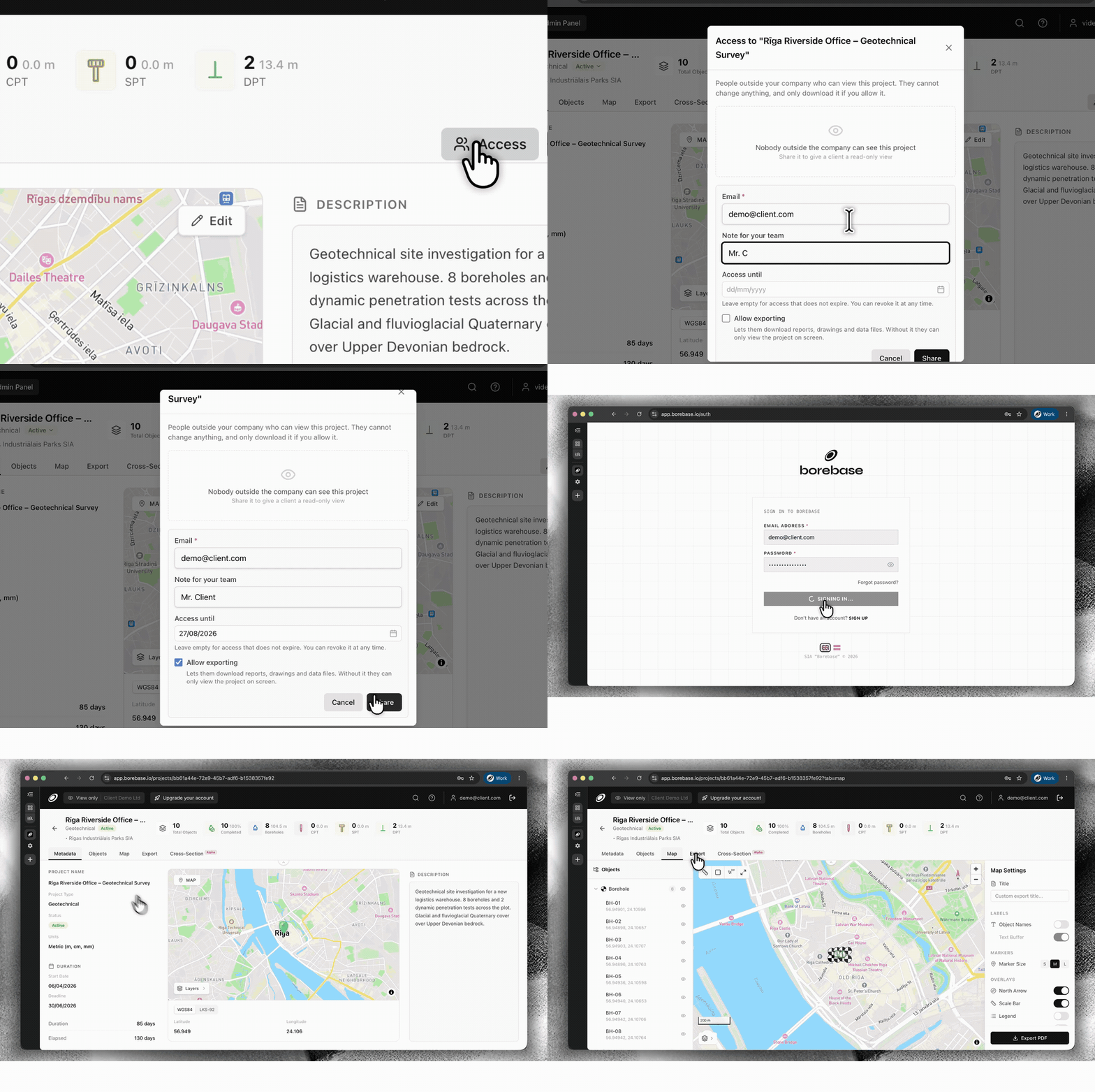
    Give a client, contractor or partner access to one project without adding them to your company workspace. Set an expiry date and decide whether they can export data or keep access view-only.

    Configure secure external project access with a Magic Link
    Set access, expiry and export permissions, then share the same live project.
  • New

    Save stratigraphy as a reusable preset

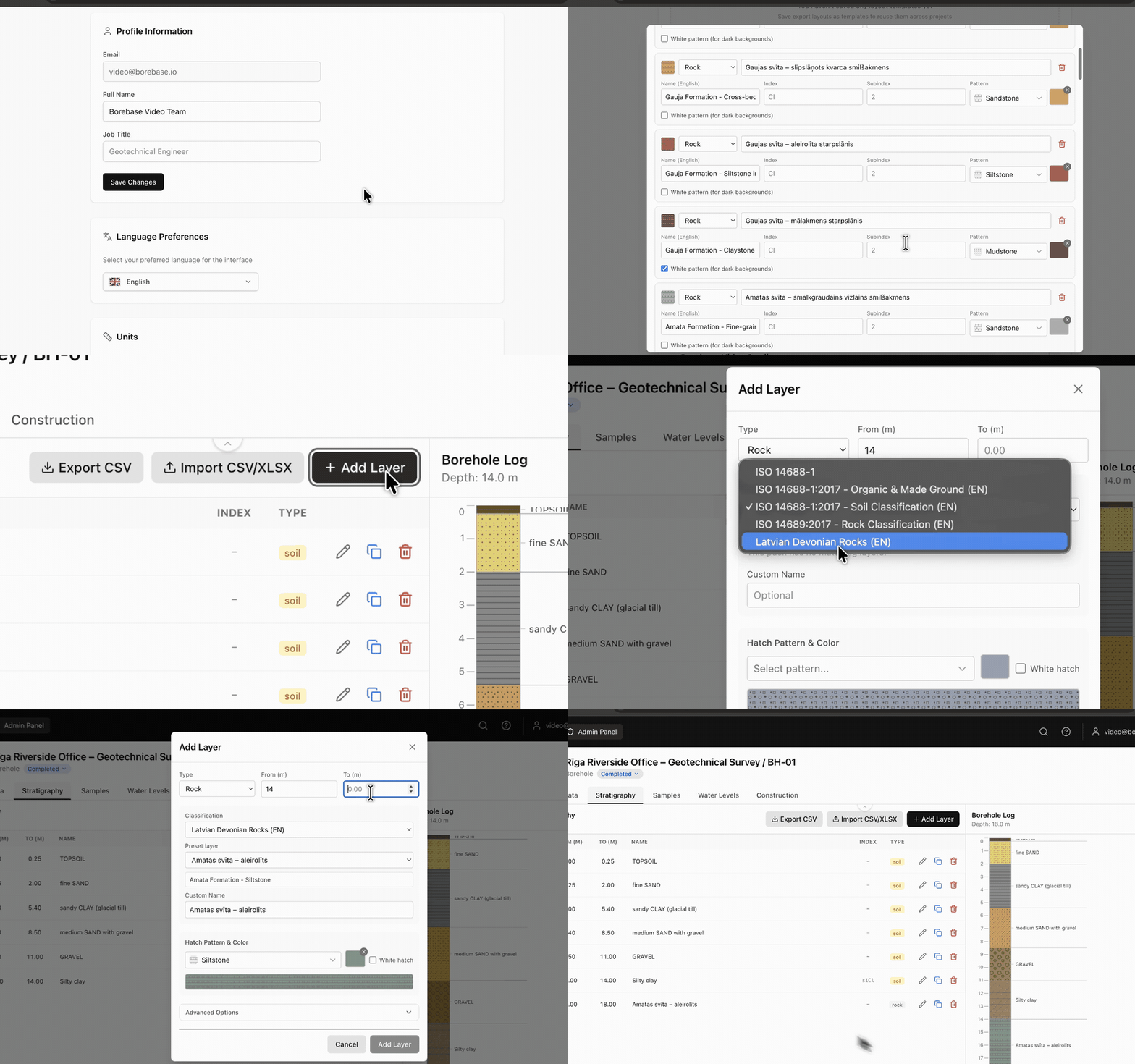
    Build your own stratigraphy preset in Settings and reuse it whenever you enter borehole data. Keep classifications, layer details, hatches and colours consistent across projects.

    Create and reuse a stratigraphy preset while logging a borehole
    Create it once in Settings. Reuse it while logging a borehole.
  • New

    Choose metric or imperial units by project

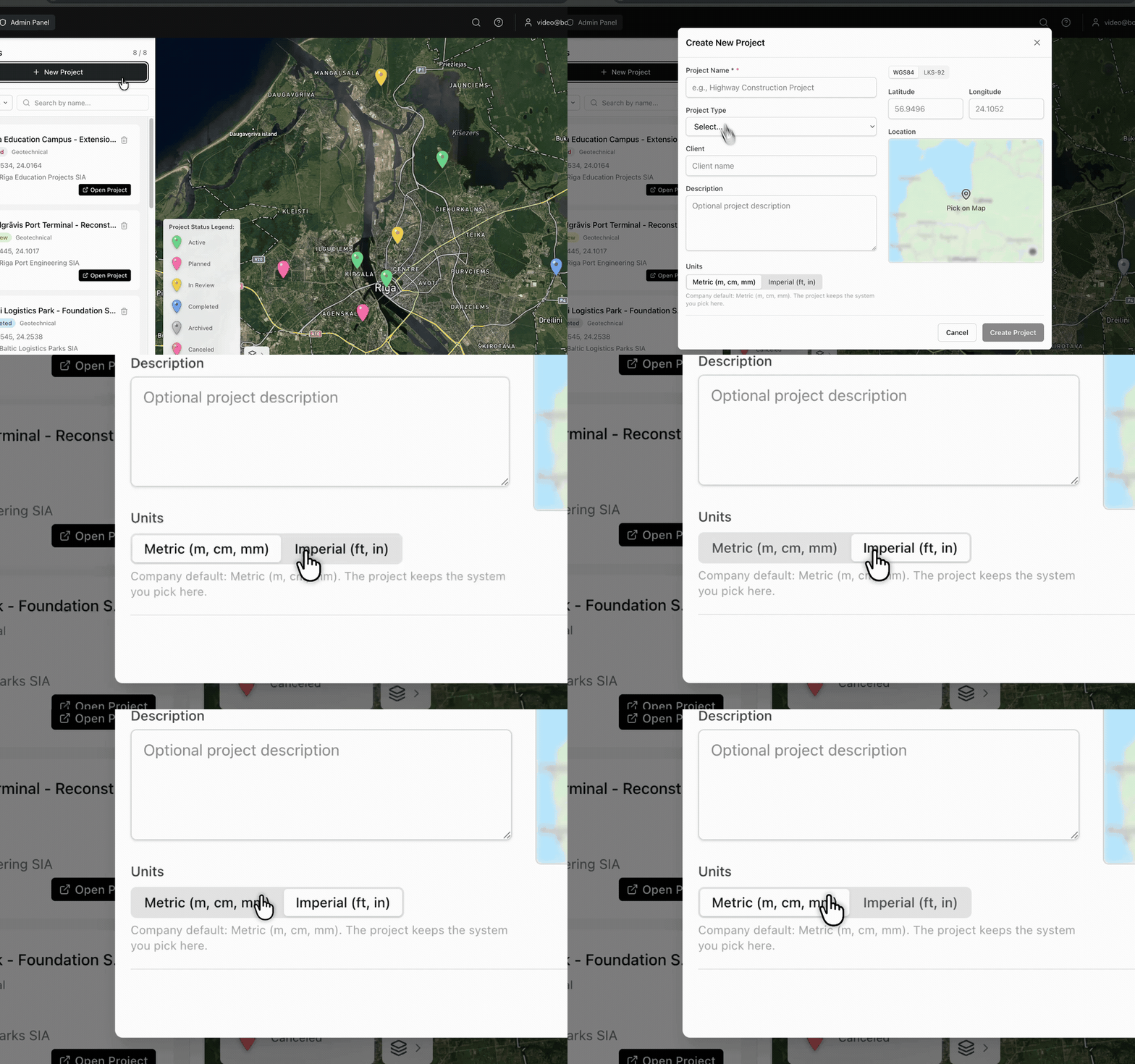
    Select Metric (m, cm, mm) or Imperial (ft, in) when you create a project. Borebase keeps the selected unit system with that project.

    Choose metric or imperial units while creating a project
    The unit system is selected at project creation and stays with the project.
v1.3.0

Faster maps, lighter exports

  • Improved

    Project maps load faster on repeat visits.

  • Improved

    Large PDF reports build noticeably faster on projects with many boreholes.

  • Fixed

    Cross-sections with a single object no longer show an empty axis.

Cookie Consent

We use essential cookies for authentication and security. We do not use analytics or advertising cookies; if that ever changes, we will ask for your consent first. Learn more